<!DOCTYPE html>
	<html lang="vi" xmlns="http://www.w3.org/1999/xhtml" prefix="og: http://ogp.me/ns#">
	<head>
<title>Tổ chức hướng dẫn trẻ làm quen với máy tính ở trường mầm non - Trường Mầm non Tuổi Xanh</title>
<meta name="description" content="Tổ chức hướng dẫn trẻ làm quen với máy tính ở trường mầm non - Savefile - Tin Tức - https://mntuoixanh.phuongthudaumot.edu.vn/savefile/giao-duc-ky-nang-song/to-chuc-huong-dan-tre-lam-quen-voi-may-tinh-o-truong-mam-non-609.html">
<meta name="author" content="Trường Mầm non Tuổi Xanh">
<meta name="copyright" content="Trường Mầm non Tuổi Xanh [webmaster@vinades.vn]">
<meta name="generator" content="NukeViet v4.5">
<meta name="viewport" content="width=device-width, initial-scale=1">
<meta http-equiv="Content-Type" content="text/html; charset=utf-8">
<meta property="og:title" content="Tổ chức hướng dẫn trẻ làm quen với máy tính ở trường mầm non">
<meta property="og:type" content="website">
<meta property="og:description" content="Savefile - Tin Tức - https://mntuoixanh.phuongthudaumot.edu.vn/savefile/giao-duc-ky-nang-song/to-chuc-huong-dan-tre-lam-quen-voi-may-tinh-o-truong-mam-non-609.html">
<meta property="og:site_name" content="Trường Mầm non Tuổi Xanh">
<meta property="og:url" content="https://mntuoixanh.phuongthudaumot.edu.vn/savefile/giao-duc-ky-nang-song/to-chuc-huong-dan-tre-lam-quen-voi-may-tinh-o-truong-mam-non-609.html">
<link rel="shortcut icon" href="https://mntuoixanh.phuongthudaumot.edu.vn/favicon.ico">
<link rel="canonical" href="https://mntuoixanh.phuongthudaumot.edu.vn/savefile/giao-duc-ky-nang-song/to-chuc-huong-dan-tre-lam-quen-voi-may-tinh-o-truong-mam-non-609.html">
<link rel="alternate" href="https://mntuoixanh.phuongthudaumot.edu.vn/rss/" title="Tin Tức" type="application/rss+xml">
<link rel="alternate" href="https://mntuoixanh.phuongthudaumot.edu.vn/rss/thong-bao-53/" title="Tin Tức - Thông báo" type="application/rss+xml">
<link rel="alternate" href="https://mntuoixanh.phuongthudaumot.edu.vn/rss/tuyen-sinh-51/" title="Tin Tức - Tuyển sinh" type="application/rss+xml">
<link rel="alternate" href="https://mntuoixanh.phuongthudaumot.edu.vn/rss/hoat-dong-nha-truong/" title="Tin Tức - Hoạt động nhà trường" type="application/rss+xml">
<link rel="alternate" href="https://mntuoixanh.phuongthudaumot.edu.vn/rss/suc-khoe-dinh-duong/" title="Tin Tức - Sức khỏe - Dinh dưỡng" type="application/rss+xml">
<link rel="alternate" href="https://mntuoixanh.phuongthudaumot.edu.vn/rss/giao-duc-ky-nang-song/" title="Tin Tức - Giáo dục kỹ năng sống" type="application/rss+xml">
<link rel="alternate" href="https://mntuoixanh.phuongthudaumot.edu.vn/rss/thong-ke-52/" title="Tin Tức - Thống kê" type="application/rss+xml">
<link rel="alternate" href="https://mntuoixanh.phuongthudaumot.edu.vn/rss/thong-tin-3-cong-khai/" title="Tin Tức - Công khai" type="application/rss+xml">
<link rel="alternate" href="https://mntuoixanh.phuongthudaumot.edu.vn/rss/thong-tin-chung-cua-truong/" title="Tin Tức - Thông tin chung của trường" type="application/rss+xml">
<link rel="alternate" href="https://mntuoixanh.phuongthudaumot.edu.vn/rss/giao-duc/" title="Tin Tức - Giáo dục" type="application/rss+xml">
<link rel="alternate" href="https://mntuoixanh.phuongthudaumot.edu.vn/rss/thu-chi-tai-chinh/" title="Tin Tức - Thu chi tài chính" type="application/rss+xml">
<link rel="alternate" href="https://mntuoixanh.phuongthudaumot.edu.vn/rss/thong-ke/" title="Tin Tức - Thống kê" type="application/rss+xml">
<link rel="alternate" href="https://mntuoixanh.phuongthudaumot.edu.vn/rss/cai-cach-hanh-chinh/" title="Tin Tức - Cải cách hành chính" type="application/rss+xml">
<link rel="preload" as="style" href="https://mntuoixanh.phuongthudaumot.edu.vn/assets/css/font-awesome.min.css" type="text/css">
<link rel="preload" as="style" href="https://mntuoixanh.phuongthudaumot.edu.vn/themes/edu41/css/bootstrap.min.css" type="text/css">
<link rel="preload" as="style" href="https://mntuoixanh.phuongthudaumot.edu.vn/themes/edu41/css/style.css" type="text/css">
<link rel="preload" as="style" href="https://mntuoixanh.phuongthudaumot.edu.vn/themes/edu41/css/style.responsive.css" type="text/css">
<link rel="preload" as="style" href="https://mntuoixanh.phuongthudaumot.edu.vn/themes/edu41/css/news.css" type="text/css">
<link rel="preload" as="style" href="https://mntuoixanh.phuongthudaumot.edu.vn/themes/edu41/css/custom.css" type="text/css">
<link rel="preload" as="script" href="https://mntuoixanh.phuongthudaumot.edu.vn/assets/js/jquery/jquery.min.js" type="text/javascript">
<link rel="preload" as="script" href="https://mntuoixanh.phuongthudaumot.edu.vn/assets/js/language/vi.js" type="text/javascript">
<link rel="preload" as="script" href="https://mntuoixanh.phuongthudaumot.edu.vn/assets/js/DOMPurify/purify3.js" type="text/javascript">
<link rel="preload" as="script" href="https://mntuoixanh.phuongthudaumot.edu.vn/assets/js/global.js" type="text/javascript">
<link rel="preload" as="script" href="https://mntuoixanh.phuongthudaumot.edu.vn/assets/js/site.js" type="text/javascript">
<link rel="preload" as="script" href="https://mntuoixanh.phuongthudaumot.edu.vn/themes/edu41/js/news.js" type="text/javascript">
<link rel="preload" as="script" href="https://mntuoixanh.phuongthudaumot.edu.vn/themes/edu41/js/custom.js" type="text/javascript">
<link rel="preload" as="script" href="https://mntuoixanh.phuongthudaumot.edu.vn/themes/edu41/js/main.js" type="text/javascript">
<link rel="preload" as="script" href="https://mntuoixanh.phuongthudaumot.edu.vn/themes/edu41/js/mn_mobile.js" type="text/javascript">
<link rel="preload" as="script" href="https://mntuoixanh.phuongthudaumot.edu.vn/themes/edu41/js/bootstrap.min.js" type="text/javascript">
<link rel="StyleSheet" href="https://mntuoixanh.phuongthudaumot.edu.vn/assets/css/font-awesome.min.css">
<link rel="StyleSheet" href="https://mntuoixanh.phuongthudaumot.edu.vn/themes/edu41/css/bootstrap.min.css">
<link rel="StyleSheet" href="https://mntuoixanh.phuongthudaumot.edu.vn/themes/edu41/css/style.css">
<link rel="StyleSheet" href="https://mntuoixanh.phuongthudaumot.edu.vn/themes/edu41/css/style.responsive.css">
<link rel="StyleSheet" href="https://mntuoixanh.phuongthudaumot.edu.vn/themes/edu41/css/news.css">
<link rel="StyleSheet" href="https://mntuoixanh.phuongthudaumot.edu.vn/themes/edu41/css/custom.css">
<style type="text/css">
	body{background: #fff;}
</style>
	</head>
	<body>
<div id="print">
	<div id="hd_print">
		<h2 class="pull-left">Trường Mầm non Tuổi Xanh</h2>
		<p class="pull-right"><a title="Trường Mầm non Tuổi Xanh" href="https://mntuoixanh.phuongthudaumot.edu.vn/">https://mntuoixanh.phuongthudaumot.edu.vn</a></p>
	</div>
	<div class="clear"></div>
	<hr />
	<div id="content">
		<h1>Tổ chức hướng dẫn trẻ làm quen với máy tính ở trường mầm non</h1>
		<ul class="list-inline">
			<li>Thứ ba - 12/03/2019 14:36</li>
			<li class="hidden-print txtrequired"><em class="fa fa-print">&nbsp;</em><a title="In ra" href="javascript:;" onclick="window.print()">In ra</a></li>
			<li class="hidden-print txtrequired"><em class="fa fa-power-off">&nbsp;</em><a title="Đóng cửa sổ này" href="javascript:;" onclick="window.close()">Đóng cửa sổ này</a></li>
		</ul>
		<div class="clear"></div>
		<div id="hometext">
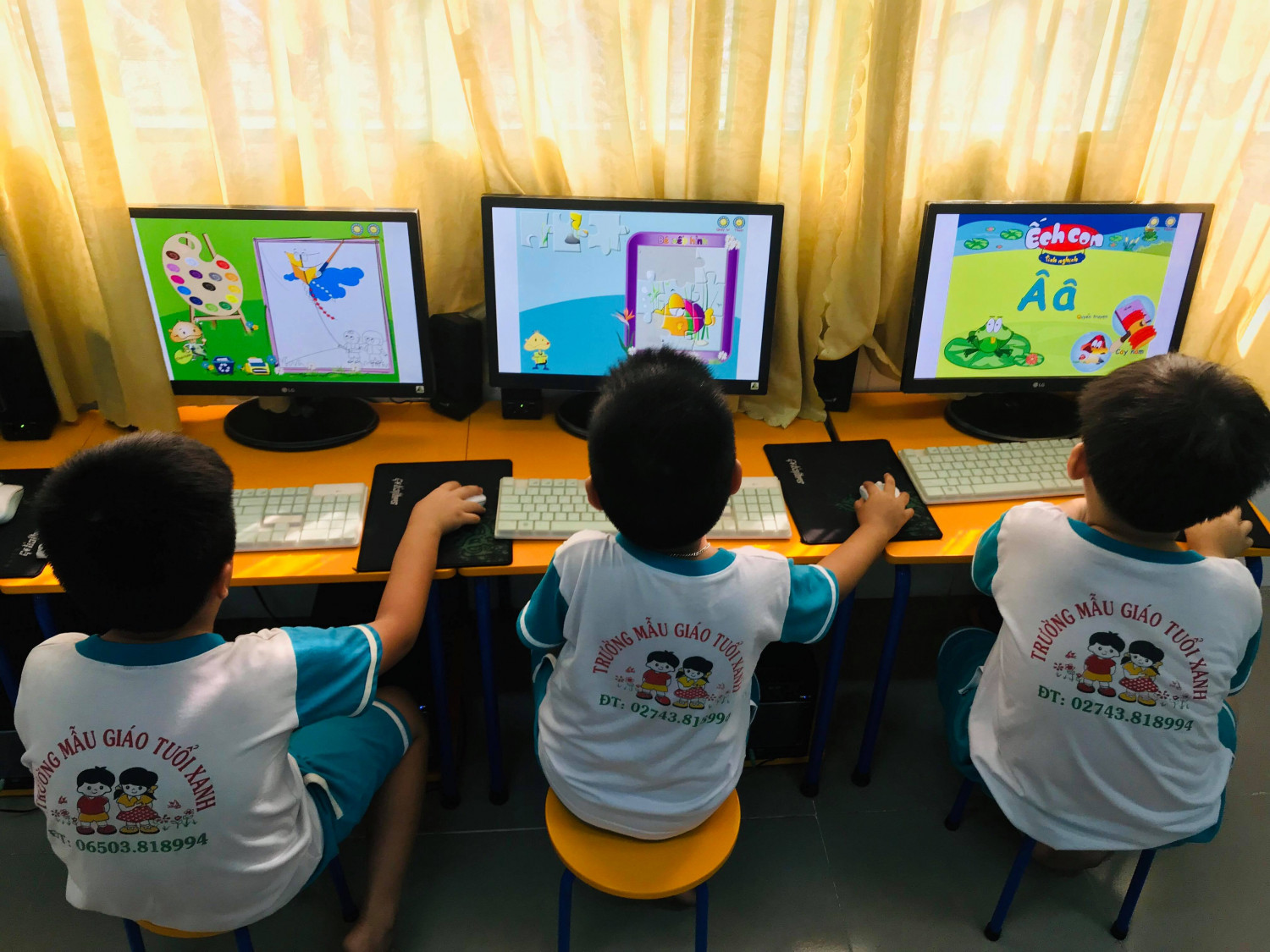
			Hoạt động cho trẻ làm quen với máy vi tính dần đã là một phần không thể thiếu trong nội dung giảng dạy đối với trẻ ở các trường mầm non chuẩn quốc gia, đặc biệt là các trường mầm non đạt chuẩn quốc gia mức độ I hiện nay.<br />Khả năng sử dụng máy tính của trẻ có thể bắt đầu ngay từ khi lên 5 tuổi
		</div>
				<div class="imghome">
			<img alt="Cháu bạn đang được chơi những trò chơi kidsmart vui lắm nè&#33;" src="https://mntuoixanh.phuongthudaumot.edu.vn/uploads/mgtuoixanh/news/2019_03/53559991_262677334666125_8166673493488828416_n.jpg" width="460" class="img-thumbnail" />
						<p>
				<em>Cháu bạn đang được chơi những trò chơi kidsmart vui lắm nè&#33;</em>
			</p>
		</div>
		<div class="clear"></div>
		<div id="bodytext" class="clearfix">
			<span style="font-size:11pt"><span style="line-height:normal"><span style="font-family:Calibri,sans-serif"><span style="font-size:14.0pt"><span style="font-family:&#039;Times New Roman&#039;,&#039;serif&#039;">1. Dạy trẻ đúng cách</span></span></span></span></span><br  />
<span style="font-size:11pt"><span style="line-height:normal"><span style="font-family:Calibri,sans-serif"><span style="font-size:14.0pt"><span style="font-family:&#039;Times New Roman&#039;,&#039;serif&#039;">- Ban đầu, bạn nên dạy trẻ cách tiếp xúc với máy vi tính thông qua việc tập đánh máy 10 ngón hoặc làm toán, vẽ tranh trên máy.</span></span></span></span></span><br  />
<span style="font-size:11pt"><span style="line-height:normal"><span style="font-family:Calibri,sans-serif"><span style="font-size:14.0pt"><span style="font-family:&#039;Times New Roman&#039;,&#039;serif&#039;">- Có thể giới thiệu cho trẻ một số trò chơi đơn giản, gần gũi với suy nghĩ của trẻ.</span></span></span></span></span><br  />
<span style="font-size:11pt"><span style="line-height:normal"><span style="font-family:Calibri,sans-serif"><span style="font-size:14.0pt"><span style="font-family:&#039;Times New Roman&#039;,&#039;serif&#039;">- Hạn chế đến mức tối đa việc trẻ tiếp xúc với các trò chơi có tính bạo lực cao hoặc gây kích thích thần kinh.</span></span></span></span></span><br  />
<span style="font-size:11pt"><span style="line-height:normal"><span style="font-family:Calibri,sans-serif"><span style="font-size:14.0pt"><span style="font-family:&#039;Times New Roman&#039;,&#039;serif&#039;">- Bạn nên hướng dẫn trẻ cách kết bạn qua mạng internet, chỉ cho trẻ thấy những việc hữu ích nên làm và những điều nên tránh.</span></span></span></span></span><br  />
<span style="font-size:11pt"><span style="line-height:normal"><span style="font-family:Calibri,sans-serif"><span style="font-size:14.0pt"><span style="font-family:&#039;Times New Roman&#039;,&#039;serif&#039;">- Đặc biệt, trẻ cần được hướng dẫn về việc không cung cấp thông tin cá nhân cho những người lạ mới nói chuyện một vài lần. Bởi đã có rất nhiều trẻ đã bị kẻ xấu lợi dụng hình ảnh và thông tin cá nhân của mình.</span></span></span></span></span><br  />
<span style="font-size:11pt"><span style="line-height:normal"><span style="font-family:Calibri,sans-serif"><span style="font-size:14.0pt"><span style="font-family:&#039;Times New Roman&#039;,&#039;serif&#039;">- Bạn chỉ nên cho trẻ tiếp xúc với máy tính có giới hạn, kiểm soát thời gian và các hoạt động của trẻ trên máy một cách chặt chẽ, định hướng cho trẻ mục đích sử dụng máy tính đúng mục đích học tập và giải trí lành mạnh.</span></span></span></span></span><br  />
<span style="font-size:11pt"><span style="line-height:normal"><span style="font-family:Calibri,sans-serif"><span style="font-size:14.0pt"><span style="font-family:&#039;Times New Roman&#039;,&#039;serif&#039;">- Thích hợp nhất là nên hướng trẻ vào niềm say mê một môn học nào đó cần sử dụng máy tính, để trẻ sử dụng nó vào mục đích học tập của mình.</span></span></span></span></span><br  />
<span style="font-size:11pt"><span style="line-height:normal"><span style="font-family:Calibri,sans-serif"><span style="font-size:14.0pt"><span style="font-family:&#039;Times New Roman&#039;,&#039;serif&#039;">- Bên cạnh đó, bạn cũng cần phải quan tâm đến thời gian ăn ngủ, sinh hoạt của trẻ, tránh để trẻ vì quá mải mê mà quên mất thói quen sinh hoạt điều độ.</span></span></span></span></span>
<div style="text-align:center">
<figure class="image" style="display:inline-block"><img alt="53384000 2029786007321684 9204732484380524544 n" height="450" src="https://mntuoixanh.phuongthudaumot.edu.vn/uploads/mgtuoixanh/news/2019_03/53384000_2029786007321684_9204732484380524544_n.jpg" width="600" />
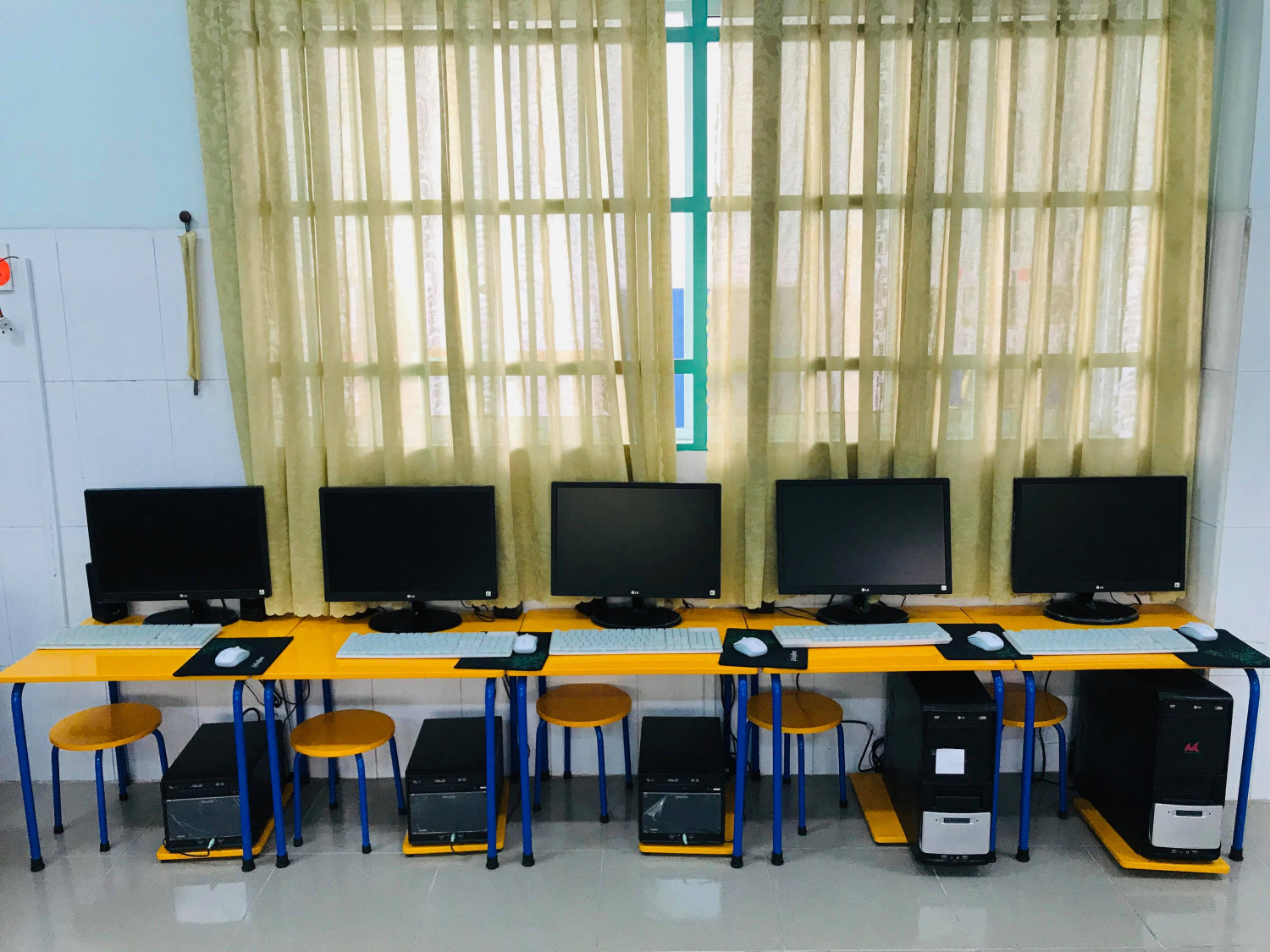
<figcaption>Phòng máy tính của trường Mẫu giáo Tuổi Xanh</figcaption>
</figure>
</div>
<br  />
<span style="font-size:11pt"><span style="line-height:normal"><span style="font-family:Calibri,sans-serif"><span style="font-size:14.0pt"><span style="font-family:&#039;Times New Roman&#039;,&#039;serif&#039;">2.Lưu ý cách tổ chức hoạt động làm quen với tin học cho trẻ mầm non tại phòng máy vi tính như sau:</span></span></span></span></span><br  />
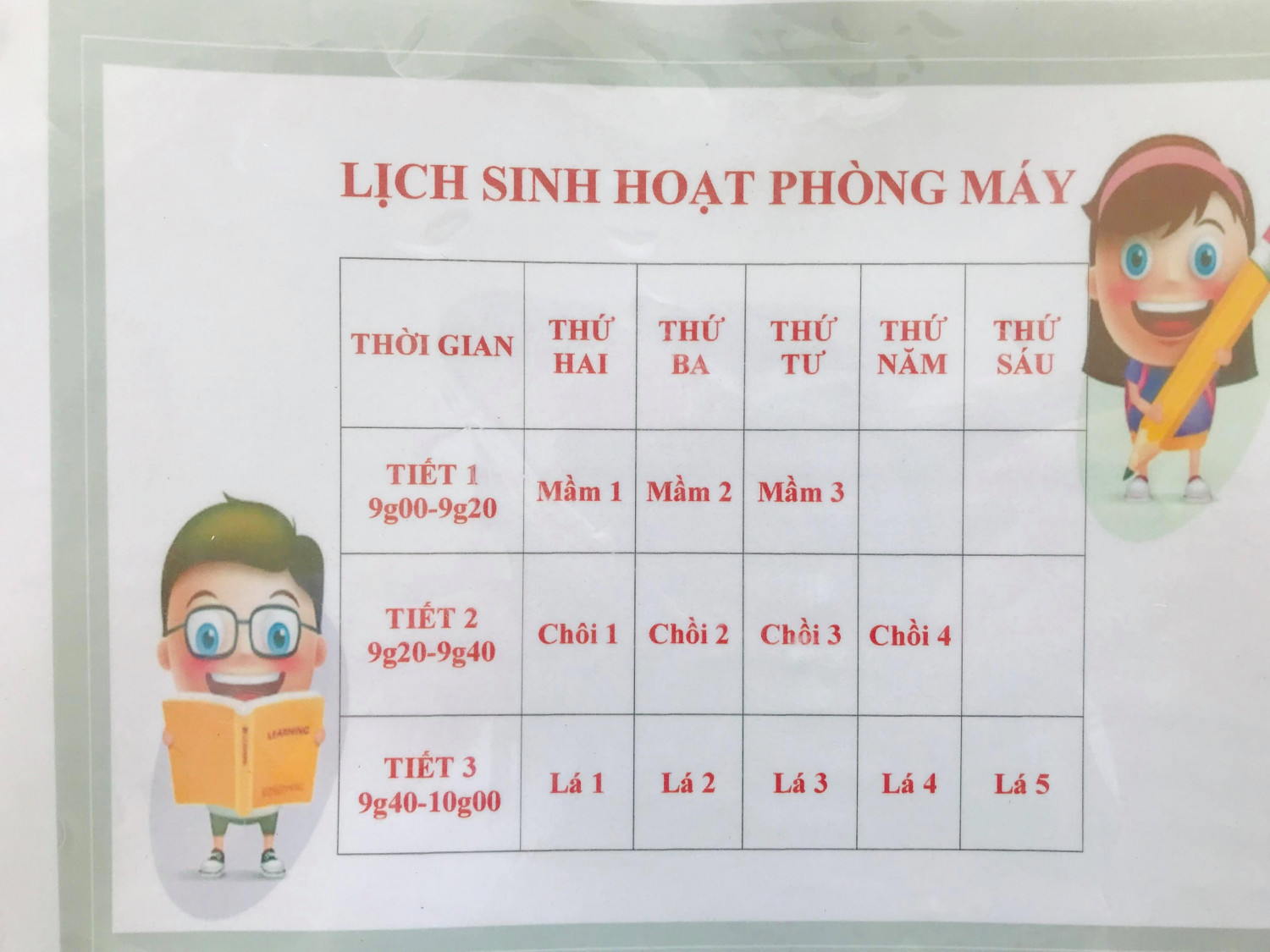
<span style="font-size:11pt"><span style="line-height:normal"><span style="font-family:Calibri,sans-serif"><span style="font-size:14.0pt"><span style="font-family:&#039;Times New Roman&#039;,&#039;serif&#039;">- Xây dựng kế hoạch: nhà trường xây dựng kế hoạch phân công thời gian hoạt động cho các lớp. Ưu tiên dành thời gian cho trẻ ở các khối lớp lớn hơn. Thời gian hoạt động trực tiếp với máy tính của mỗi trẻ không nên quá 25 phút/ 01 hoạt động.</span></span></span></span></span><br  />
<span style="font-size:11pt"><span style="line-height:normal"><span style="font-family:Calibri,sans-serif"><span style="font-size:14.0pt"><span style="font-family:&#039;Times New Roman&#039;,&#039;serif&#039;">Kế hoạch hoạt động của các lớp cần phải cụ thể về:</span></span></span></span></span><br  />
<span style="font-size:11pt"><span style="line-height:normal"><span style="font-family:Calibri,sans-serif"><span style="font-size:14.0pt"><span style="font-family:&#039;Times New Roman&#039;,&#039;serif&#039;">+ Nội dung và thời gian dành cho từng nội dung giáo dục;</span></span></span></span></span><br  />
<span style="font-size:11pt"><span style="line-height:normal"><span style="font-family:Calibri,sans-serif"><span style="font-size:14.0pt"><span style="font-family:&#039;Times New Roman&#039;,&#039;serif&#039;">+ Lựa chọn, sắp xếp các kiến thức từ dễ đến khó, từ các kiến thức, thao tác cơ bản đến các kiến thức, kỹ năng khó hơn;</span></span></span></span></span><br  />
<span style="font-size:11pt"><span style="line-height:normal"><span style="font-family:Calibri,sans-serif"><span style="font-size:14.0pt"><span style="font-family:&#039;Times New Roman&#039;,&#039;serif&#039;">+ Dành thời gian cho trẻ tự khám phá và thời gian cho trẻ thực hiện các hoạt động tái hiện lại các kiến thức, kỹ năng, thể hiện cảm xúc của trẻ đối với các nội dung trẻ được học như: vẽ, xé dán, in hình, tô màu, kể lại, bắt chước các nhân vật, hát, múa…</span></span></span></span></span>

<div style="text-align:center">
<figure class="image" style="display:inline-block"><img alt="53871643 675584392857508 3564802634973970432 n 1" height="450" src="https://mntuoixanh.phuongthudaumot.edu.vn/uploads/mgtuoixanh/news/2019_03/53871643_675584392857508_3564802634973970432_n_1.jpg" width="600" />
<figcaption>Lịch sinh hoạt phòng máy cho các khối lớp</figcaption>
</figure>
</div>
<br  />
<span style="font-size:11pt"><span style="line-height:normal"><span style="font-family:Calibri,sans-serif"><span style="font-size:14.0pt"><span style="font-family:&#039;Times New Roman&#039;,&#039;serif&#039;">- Sắp xếp bố trí giáo viên có khả năng về tin học để hướng dẫn trẻ học tại phòng vi tính. Có thể bố trí giáo viên này hỗ trợ cho giáo viên của các lớp khi cần thiết.</span></span></span></span></span><br  />
<span style="font-size:11pt"><span style="line-height:normal"><span style="font-family:Calibri,sans-serif"><span style="font-size:14.0pt"><span style="font-family:&#039;Times New Roman&#039;,&#039;serif&#039;">- Đảm bảo rằng hệ thống điện không là nguy cơ dẫn đến các mối nguy hiểm đối với trẻ; phòng đủ ánh sáng và có không gian thoáng mát.</span></span></span></span></span><br  />
<span style="font-size:11pt"><span style="line-height:normal"><span style="font-family:Calibri,sans-serif"><span style="font-size:14.0pt"><span style="font-family:&#039;Times New Roman&#039;,&#039;serif&#039;">- Tổ chức hướng dẫn cho trẻ làm quen với tin học theo kế hoạch. Trong quá trình tổ chức hoạt động này giáo viên nên chú ý:</span></span></span></span></span><br  />
<span style="font-size:11pt"><span style="line-height:normal"><span style="font-family:Calibri,sans-serif"><span style="font-size:14.0pt"><span style="font-family:&#039;Times New Roman&#039;,&#039;serif&#039;">+ Giai đoạn trẻ mới được tiếp xúc với máy vi tính, giáo viên nên hướng dẫn trẻ các thao tác đơn giản bằng biện pháp sử dụng lời nói kết hợp làm mẫu.</span></span></span></span></span><br  />
<span style="font-size:11pt"><span style="line-height:normal"><span style="font-family:Calibri,sans-serif"><span style="font-size:14.0pt"><span style="font-family:&#039;Times New Roman&#039;,&#039;serif&#039;">Đặc biệt là các thao tác ở máy, tắt máy hoặc thoát các chương trình, các file nhằm giảm thiểu việc lỗi máy. Khi trẻ đã quen dần với cách sử dụng máy, ta có thể mở các trò chơi đơn giản được cài sẵn vào máy cho trẻ chơi vừa tập trẻ sử dụng máy vừa mang tính chất giải trí cho trẻ.</span></span></span></span></span><br  />
<span style="font-size:11pt"><span style="line-height:normal"><span style="font-family:Calibri,sans-serif"><span style="font-size:14.0pt"><span style="font-family:&#039;Times New Roman&#039;,&#039;serif&#039;">+ Trẻ mầm non vốn tò mò, thích tự khám phá khi được tiếp xúc với máy vi tính. Giáo viên nên tận dụng đặc điểm tâm lý này của trẻ để gợi ý cho trẻ tự khám phá từng nội dung giáo dục. Giáo viên lúc này vai trò chủ yếu là bao quát, hướng dẫn, giúp đỡ khi trẻ gặp khó khăn.</span></span></span></span></span><br  />
<span style="font-size:11pt"><span style="line-height:normal"><span style="font-family:Calibri,sans-serif"><span style="font-size:14.0pt"><span style="font-family:&#039;Times New Roman&#039;,&#039;serif&#039;">+ Tư thế ngồi của trẻ trong giai đoạn phát triển này là rất quan trọng, giúp hình thành cho trẻ thói quen và tư thế ngồi đúng. Do vậy, cần đảm bảo bàn ghế đúng quy cách và giáo viên hướng dẫn luôn chú ý đến tư thế ngồi của trẻ.</span></span></span></span></span><br  />
<span style="font-size:11pt"><span style="line-height:normal"><span style="font-family:Calibri,sans-serif"><span style="font-size:14.0pt"><span style="font-family:&#039;Times New Roman&#039;,&#039;serif&#039;">+ Để khắc sâu các kiến thức và phát triển khả năng tư duy sáng tạo cho trẻ, giáo viên cần tổ chức các hoạt động sau giờ làm quen với máy vi tính, tạo cơ hội cho trẻ tái hiện các kiến thức, cảm xúc của bản thân, của nhóm.</span></span></span></span></span><br  />
<span style="font-size:11pt"><span style="line-height:normal"><span style="font-family:Calibri,sans-serif"><span style="font-size:14.0pt"><span style="font-family:&#039;Times New Roman&#039;,&#039;serif&#039;">+ Việc bảo trì hệ thống máy tính, mạng internet cần được nhà trường quan tâm thường xuyên, tránh trường hợp máy hỏng ảnh hưởng đến kế hoạch hoạt động của các lớp.</span></span></span></span></span><br  />
&nbsp;
		</div>
	</div>
	<div id="footer" class="clearfix">
		<div id="url">
			<strong>URL của bản tin này: </strong><a href="https://mntuoixanh.phuongthudaumot.edu.vn/savefile/giao-duc-ky-nang-song/to-chuc-huong-dan-tre-lam-quen-voi-may-tinh-o-truong-mam-non-609.html" title="Tổ chức hướng dẫn trẻ làm quen với máy tính ở trường mầm non">https://mntuoixanh.phuongthudaumot.edu.vn/savefile/giao-duc-ky-nang-song/to-chuc-huong-dan-tre-lam-quen-voi-may-tinh-o-truong-mam-non-609.html</a>

		</div>
		<div class="clear"></div>
		<div class="copyright">
			&copy; Trường Mầm non Tuổi Xanh
		</div>
		<div id="contact">
			<a href="mailto:webmaster@vinades.vn">webmaster@vinades.vn</a>
		</div>
	</div>
</div>
        <div id="timeoutsess" class="chromeframe">
            Bạn đã không sử dụng Site, <a onclick="timeoutsesscancel();" href="https://mntuoixanh.phuongthudaumot.edu.vn/#">Bấm vào đây để duy trì trạng thái đăng nhập</a>. Thời gian chờ: <span id="secField"> 60 </span> giây
        </div>
        <div id="openidResult" class="nv-alert" style="display:none"></div>
        <div id="openidBt" data-result="" data-redirect=""></div>
<div id="run_cronjobs" style="visibility:hidden;display:none;"><img alt="cron" src="/index.php?second=cronjobs&amp;p=l610Ch21" width="1" height="1" /></div>
<script src="https://mntuoixanh.phuongthudaumot.edu.vn/assets/js/jquery/jquery.min.js"></script>
<script>var nv_base_siteurl="/",nv_lang_data="vi",nv_lang_interface="vi",nv_name_variable="nv",nv_fc_variable="op",nv_lang_variable="language",nv_module_name="news",nv_func_name="savefile",nv_is_user=0, nv_my_ofs=7,nv_my_abbr="+07",nv_cookie_prefix="nv4c_Cgoz2",nv_check_pass_mstime=1738000,nv_area_admin=0,nv_safemode=0,theme_responsive=1,nv_recaptcha_ver=2,nv_recaptcha_sitekey="6LcNwC8UAAAAAMm8ZTYNygweLUQtOU0IapbDRk69",nv_recaptcha_type="image",XSSsanitize=1;</script>
<script src="https://mntuoixanh.phuongthudaumot.edu.vn/assets/js/language/vi.js"></script>
<script src="https://mntuoixanh.phuongthudaumot.edu.vn/assets/js/DOMPurify/purify3.js"></script>
<script src="https://mntuoixanh.phuongthudaumot.edu.vn/assets/js/global.js"></script>
<script src="https://mntuoixanh.phuongthudaumot.edu.vn/assets/js/site.js"></script>
<script src="https://mntuoixanh.phuongthudaumot.edu.vn/themes/edu41/js/news.js"></script>
<script src="https://mntuoixanh.phuongthudaumot.edu.vn/themes/edu41/js/custom.js"></script>
<script src="https://mntuoixanh.phuongthudaumot.edu.vn/themes/edu41/js/main.js"></script>
<script src="https://mntuoixanh.phuongthudaumot.edu.vn/themes/edu41/js/mn_mobile.js"></script>
<script src="https://mntuoixanh.phuongthudaumot.edu.vn/themes/edu41/js/bootstrap.min.js"></script>
</body>
</html>